Picking a gaming headset gets easier when you stop starting with the brand. Start with what you play on. Then decide how you want to connect, how much you depend on your mic, how long your sessions run, and whether noise cancellation or Bluetooth at the same time actually matters to you. A headset that is excellent on paper can still be the wrong pick if it does not fit your platform or your desk.
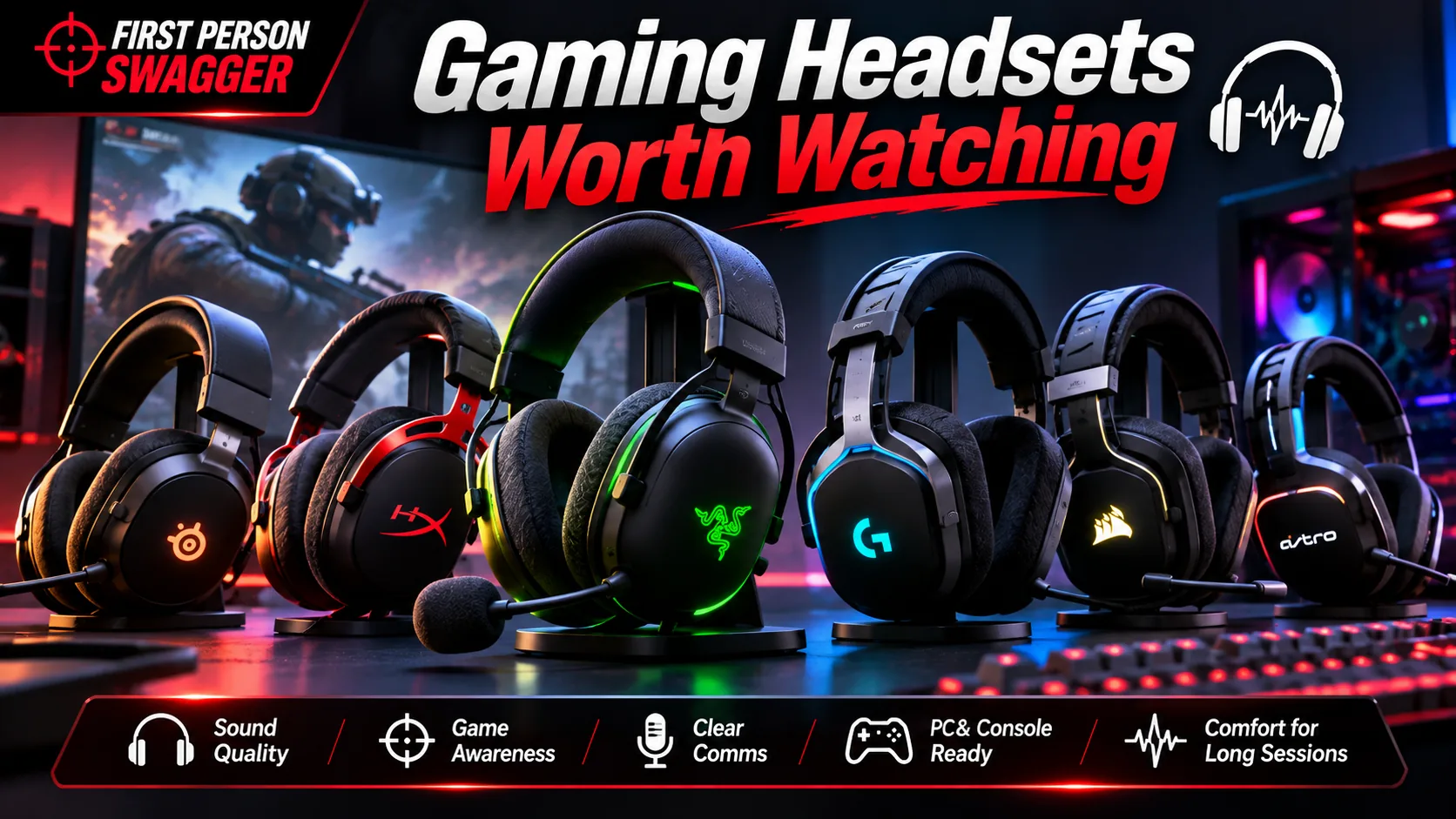
This guide covers six current headsets worth shortlisting in late 2026. Each one is built around a different priority: competitive focus, multi-system convenience, feature depth, battery life, premium audio features, or practical everyday use. Product details are based on each manufacturer's official positioning and listed specifications as of November 2026. Specs, platform versions, and prices change, so confirm the current official product page before you buy.
Quick picks
- Best for competitive FPS focus: Razer BlackShark V3 Pro
- Best for a premium multi-system desk setup: Logitech G Astro A50 X
- Best premium ANC and feature-heavy option: SteelSeries Arctis Nova Pro Wireless
- Best long-battery practical pick: HyperX Cloud III S Wireless
- Best for premium audio features and ecosystem: Corsair Virtuoso Max Wireless
- Best balanced wireless alternative: SteelSeries Arctis Nova 7 Wireless Gen 2
These are "best for" picks tied to a use case, not a universal ranking. The right headset for a ranked FPS player is not necessarily the right one for someone who switches between three systems every evening.
Razer BlackShark V3 Pro
Why it stands out
The BlackShark V3 Pro is Razer's current flagship esports headset, and its feature set reflects that focus. It uses HyperSpeed Wireless Gen-2 for 2.4 GHz play, and Razer markets it around ultra-low-latency wireless and competitive positional audio. It also adds hybrid active noise cancellation, which is useful if you play in a noisy room or want fewer distractions during ranked matches.
Connection flexibility is a real strength. It supports 2.4 GHz and Bluetooth at the same time, plus USB and 3.5 mm options. That means you can keep game audio on the low-latency wireless link while taking a call or listening to something from your phone over Bluetooth. You also have wired fallbacks if a battery runs low or a wireless setup is not practical.
The detachable 12 mm full-band mic is another competitive-minded choice. A detachable boom gives you a proper positioned mic for team chat, and you can remove it when you only want to listen.
What to watch for
Razer sells platform-optimized versions for PC, PlayStation, and Xbox. Do not assume one model behaves identically on every system. Xbox compatibility in particular usually depends on buying the version made for it. Check that the exact version you are buying lists your main platform.
It is also positioned as a flagship, so it sits in the premium tier. If you do not need ANC or simultaneous Bluetooth, you may be paying for features you will not use.
Best for
Competitive FPS players who want a low-latency wireless headset with a detachable mic, ANC, and flexible connection options. It also suits anyone who wants game audio and phone audio at the same time.
SteelSeries Arctis Nova Pro Wireless
Why it stands out
SteelSeries still positions the Arctis Nova Pro Wireless as its premium, top-tier wireless gaming headset with active noise cancellation. It is designed for players who want a feature-rich flagship rather than a simple plug-and-play headset. The Nova Pro family spans multiple platforms, so there are options aimed at different system setups.
Its appeal is breadth. It combines ANC, premium-tier positioning, and a deeper feature set than most mainstream wireless headsets. If you like adjusting your audio and want one headset that covers gaming, ambient noise control, and everyday listening, it is a strong candidate.
What to watch for
The feature-heavy design is also its main tradeoff. If all you need is reliable wireless game audio and clear chat, much of the Nova Pro's added complexity and premium cost may be unnecessary. Battery and runtime details should be checked on SteelSeries' current official spec page, as figures can vary by configuration and settings such as ANC.
As with any multi-platform family, confirm that the version you are considering supports the systems you actually use.
Best for
Players who want a premium ANC headset with a deep feature set, and who will actually use the extra controls instead of setting them once and forgetting them.
Logitech G Astro A50 X
Why it stands out
The Astro A50 X is still listed by Logitech G as a current premium model. It is built around a base station and Logitech's PLAYSYNC feature, which is designed to make switching between systems easier from one desk setup. That focus on multi-system convenience is what separates it from most headsets in this guide.
If your desk has more than one system connected — for example a PC and a console, or more than one console — the A50 X is designed to reduce the friction of moving between them. The base station also gives the headset a fixed home, so it stays organized as part of the setup rather than something you plug in each time.
What to watch for
The A50 X is a complex, premium setup. The base station takes up space and needs to be connected to the systems you want to use, which makes it much less portable than a headset with a small USB dongle. If you only play on one console, most of its central feature — switching between systems — will go unused, and it may be overkill.
This guide does not rank its sound quality against the other headsets. Its clearest advantage is convenience across multiple systems.
Best for
Players with a dedicated desk setup and more than one gaming system who value fast, organized switching and are comfortable with a premium, base-station-based headset.
HyperX Cloud III S Wireless
Why it stands out
The Cloud III S Wireless is a current HyperX model, and its headline feature is battery life: HyperX lists up to 120 hours. For players who hate charging, that is a major practical advantage.
It connects over 2.4 GHz, Bluetooth, or Instant Pair, and uses angled 53 mm drivers. For voice chat, it combines a detachable boom mic with internal mics, so you can use the boom for team communication and the internal mics when you want a cleaner look away from the desk. HyperX also highlights its durable metal frame.
What to watch for
This guide does not list ANC as a feature of the Cloud III S Wireless, so do not choose it for noise cancellation. Battery life is listed as "up to" a figure, and real-world results depend on usage and settings. As always, confirm platform support for your main system before buying.
Best for
Players who want long battery life, flexible wireless options, and a durable build in a practical headset — without paying for flagship features like ANC.
Corsair Virtuoso Max Wireless
Why it stands out
The Virtuoso Max Wireless is Corsair's current premium wireless model. Corsair positions it around high-fidelity audio, support for multiple platforms, Dolby Atmos and spatial audio features, and integration with its iCUE software.
If you already use Corsair peripherals and iCUE, the Virtuoso Max can fit neatly into an existing setup. It is aimed at players who want premium audio features and a polished, high-end headset rather than a stripped-down competitive model.
What to watch for
Software and platform feature support can differ. Spatial audio and Dolby Atmos availability may depend on the platform, connection, or software you use, so check Corsair's official page for which features work on your system. Some features may also depend on iCUE, which is PC software, so console players may not get the same level of control.
It is a premium-tier headset. If you do not care about spatial audio or ecosystem integration, simpler models may cover your needs.
Best for
Players who want premium audio features and spatial audio options, especially on PC, and those already invested in Corsair's iCUE ecosystem.
SteelSeries Arctis Nova 7 Wireless Gen 2
Why it stands out
The Arctis Nova 7 Wireless Gen 2 is SteelSeries' current mid-to-premium wireless model, and it focuses on practical features. SteelSeries lists 50 hours of battery life, Dual Wireless with 2.4 GHz and Bluetooth, and real-time audio control through a mobile app.
That combination covers what many players actually use day to day: low-latency game audio, phone audio or calls over Bluetooth, and quick adjustments without opening desktop software mid-match.
What to watch for
It does not try to match flagship models on every feature. If you need ANC or the deepest set of controls, look at the Arctis Nova Pro Wireless or another flagship instead. Confirm that the version you choose supports your main platform.
Best for
Players who want a balanced, practical wireless headset with good battery life and Bluetooth at the same time, without moving up to flagship complexity or price.
How to choose a gaming headset in 2026
Platform first
Check compatibility before anything else. Many headset families have separate PC, PlayStation, and Xbox versions, and Xbox wireless support often requires the Xbox-specific model. A headset that works perfectly on PC may lose features — or wireless support — on another system.
2.4 GHz vs Bluetooth
For gaming, a dedicated 2.4 GHz wireless connection is usually the better choice because it is designed for game audio. Bluetooth is convenient for phones, calls, and music, but it is not usually the connection you want for competitive play.
Simultaneous wireless
Some headsets can use 2.4 GHz and Bluetooth at the same time. That lets you hear game audio while taking a call or listening to your phone. If you often do both, put this near the top of your checklist.
Mic quality: detachable and internal mics
A detachable boom mic usually gives you better positioning for team chat. Internal mics are convenient when you want to remove the boom. If you play squad-based games with voice communication, mic design matters as much as the speakers.
ANC vs passive isolation
Active noise cancellation reduces outside noise electronically, which can help in loud rooms. Passive isolation comes from the ear cushions and fit. If your room is already quiet, you may not need ANC.
Battery life
Battery figures are usually listed as "up to" values and depend on volume, lighting, ANC, and connection type. Use them to compare headsets, then expect some variation in daily use.
Comfort and weight
Comfort depends on your head shape, glasses, ear size, and session length. Treat listed weight as a rough guide rather than a guarantee of comfort, and try a headset on when possible.
Software dependence
Some features only work through companion software or apps. Check whether the software runs on your platform. PC desktop software may not help console players.
Wired fallback
A USB or 3.5 mm option gives you a backup when the battery runs low or wireless is not practical. It also makes a headset more versatile across devices.
What FPS players should prioritize
For FPS games, focus on the basics before extra features:
- Clear positional cues. You need to hear footsteps, reloads, and abilities clearly enough to judge where they are coming from. A balanced, clear sound often helps more than exaggerated bass.
- A reliable connection. Choose a stable, low-latency 2.4 GHz connection for game audio, and keep a wired fallback for sessions where wireless is not ideal.
- A usable mic. Teammates should hear you clearly without constant background noise.
- Comfort over long sessions. A headset you want to remove after an hour will hurt your focus.
Branded surround or spatial audio can be useful, but it does not automatically make you a better competitive player. Some players prefer it, while others find stereo clearer. Test both in the games you play.
Which one should you shortlist?
- You play ranked FPS on one main platform: start with the Razer BlackShark V3 Pro, choosing the version made for your platform.
- You switch between several systems at one desk: look at the Logitech G Astro A50 X.
- You want premium ANC and a deep feature set: consider the SteelSeries Arctis Nova Pro Wireless.
- You want to charge as rarely as possible: shortlist the HyperX Cloud III S Wireless.
- You want premium audio features and use Corsair's iCUE: consider the Corsair Virtuoso Max Wireless.
- You want a practical wireless headset with Bluetooth at the same time: look at the SteelSeries Arctis Nova 7 Wireless Gen 2.
Final takeaway
Shortlist headsets by your use case and platform first. Then compare the current official compatibility lists and specs for the exact version you plan to buy. The right headset is the one that fits how and where you play.